 Edward Stull
Education nonprofit Battelle for Kids boosted learning across 800+ schools by redesigning its LMS for intuitive, faster access.
 The challenge
How might an organization better support users of a mature product?
 About the Project
Battelle for Kids (BFK) is a national not-for-profit organization that develops innovative educational products and services. Edward Stull Consulting led the efforts to research, design, and test a new iteration of their flagship learning management system.
Key Impacts
Improved Learning Outcomes
Across 800+ organizations, faster access, intuitive navigation, and contextual help drove modest course completion improvements. Ultimately, this translates to better student learning outcomes—the non-profit's core success metric.

Reduced Support Costs
Expanding in-screen video guidance across all primary screens promised to significantly lower BFK's customer support costs, as these videos preempt common support requests, compounding savings as the user base expands.

Streamlined Course Management
The previous multi-modal, modal-heavy interface forced considerable context-switching for curriculum creators. Simplifying these workflows into clear, task-oriented screens reduced administrative burden and streamlined course management.

Improved Course Discovery
With over 100 courses, the prior system’s catalog struggled to support user needs. The updated design grouped courses into “In-Progress,” “Recommended,” and “Completed” segments, reducing cognitive load and helping users quickly find relevant content.
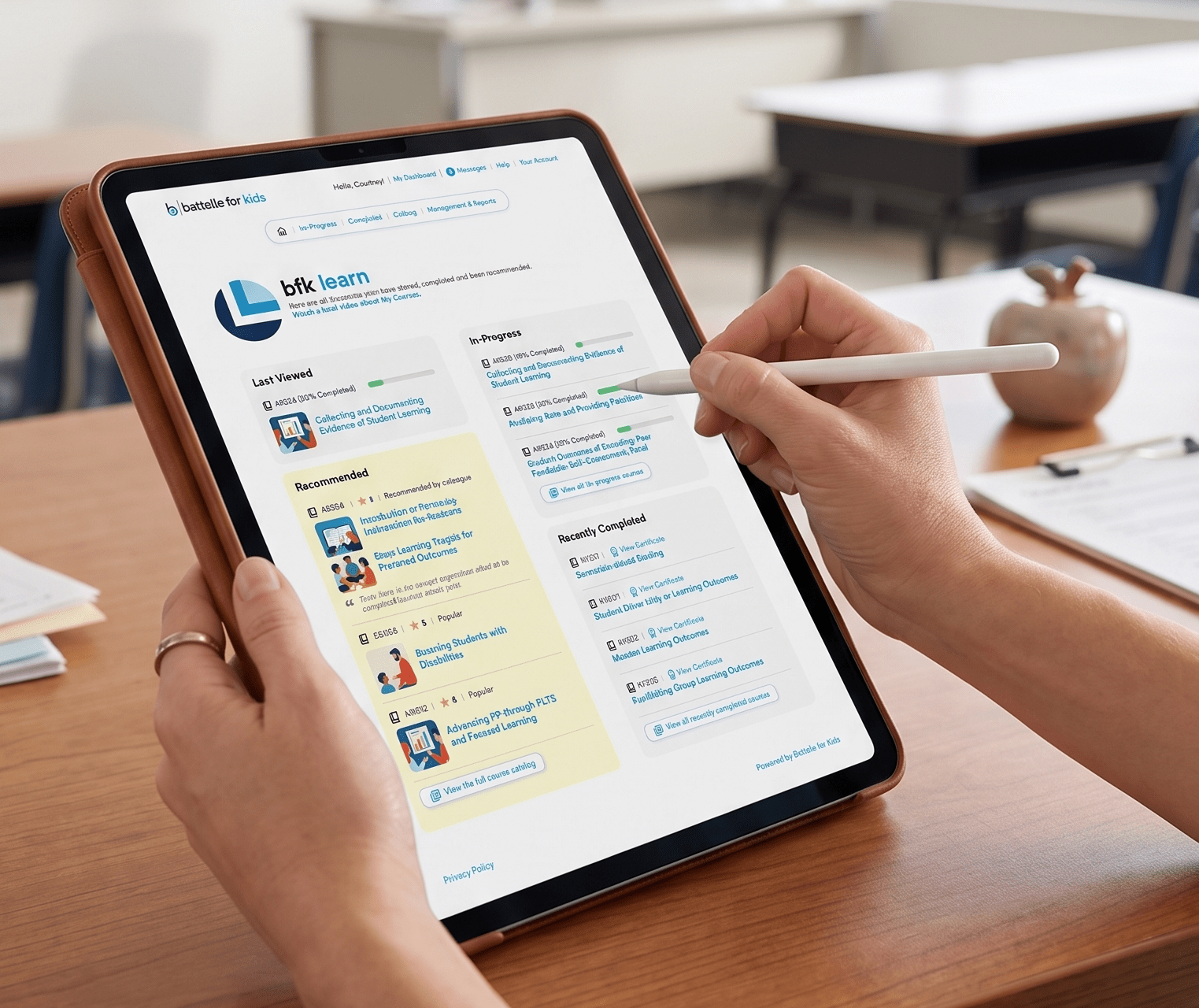 Cropped mockup of homepage ( View image )
The learning management system (LMS) was an already mature product, but it needed to better serve the needs of its audiences. Partnering with CNTXT, the team improved the LMS by thoroughly investigating the problem space, revealing and prioritizing the true jobs to be done within the system.

more
The user stories and JTBD statements underpinned our prototyping efforts, producing several rounds of building and testing. Successful approaches could then be introduced into the live system and be measured quantitatively through the LMS’s analytics.
Students were able to quickly access their courses upon signing into the system. We emphasized the “Last Viewed” course, as this course was most frequently accessed.

more
With over 100 available courses, finding a course could prove to be a challenge. To alleviate this issue, we first segmented the corpus with terminology that was already familiar to users – in-progress, recommended, and completed courses. Filtering provided further delineation.
Each primary screen was paired with a video describing how to use the on-screen information. Such an approach remedies many of the most common customer support requests.
"Administrators wished to see the 'big picture' of how an implementation performed across their school or district."

more
Administrators wished to see the “big picture” of how an implementation performed across their school or district. Here they could view the activity of their organization, filtered by individual courses and date segmentations.
For example, in the screenshot above, administrators could quickly see that 794 users had interacted with the system on February 4th. Each date displayed a corresponding list of links to individual user detail pages, thereby giving administrators both "big picture" and granular data about their programs.

more
Curriculum creators managed courses through a WYSIWYG (what-you-see-is-what-you-get) interface, mirroring how courses would be viewed by students and teachers. The distillation of multiplied modals into a single screen helped reduce the rinse-and-repeat input processes of the prior system.
Existing research and workshopping
Within mature product lines, you can often find rich repositories of existing research data. The data comes in the form of previous studies as well as customer support tickets, call logs, and analytics. Battelle for Kids had a wealth of existing research. Yet, the true effort involved making such data usable to its decision makers and product teams.
more
We collected and reconciled a vast trove of existing research data, including recent qualitative user interviews. These reconciled findings were then presented in a “research roundup.” Here the team could review findings and do gap analysis of the questions we still needed to answer through additional research.
Once the analysis was completed, the team workshopped the pains and gains for numerous stakeholders and users. For example, not only did we consider students and teachers, but also the needs of backstage curriculum authors and administrators. After all, the LMS would not be successful without the high-quality content that would be created and maintained within the system. Needs were then translated into user stories and jobs-to-be-done (JTBD) statements.

 Impact
- Improved Learning Outcomes: Across 800+ organizations, faster access, intuitive navigation, and contextual help drove modest course completion improvements. Ultimately, this translates to better student learning outcomes—the non-profit's core success metric.
more
- Reduced Support Costs: Expanding in-screen video guidance across all primary screens promised to significantly lower BFK's customer support costs, as these videos preempt common support requests, compounding savings as the user base expands.
- Reduced Friction: Featuring the "Last Viewed" course prominently on the homepage reduced login friction and time-to-engagement. Across 800+ organizations, this aggregate time savings increased overall course completion rates.
- Comprehensive JTBD Framework: Including administrators and curriculum authors alongside students and teachers in workshops created a more robust Jobs-to-be-Done framework, ensuring the critical needs of content creators and program monitors were not overlooked.
- Data-Driven Feedback Loop: Prototyping iteratively and measuring live solutions via LMS analytics established a closed feedback loop. This elevated success standards by validating design decisions with behavioral data rather than self-reported satisfaction.
- Shared Research Ownership: Presenting research findings as a collaborative, team-facing deliverable for gap analysis fostered research literacy and shared ownership, preventing isolated design decisions by uninformed team members.
- Streamlined Authoring: By mirroring the student view, the WYSIWYG authoring interface removed the need for creators to mentally simulate edits. This accelerated content creation and improved published course accuracy.
- Consolidated Research Data: Organizing existing research—like interviews, support tickets, and analytics—into a structured roundup gave the team a unified view. This enabled gap analysis, prevented duplicate effort, and grounded design decisions in comprehensive evidence.
- Intuitive Catalog Navigation: Segmenting the 100+ course catalog using contextual filtering and familiar terms (In-Progress, Recommended, Completed) ensured effortless navigation without imposing unfamiliar organizational structures on students or teachers.
- Streamlined Course Editor: By consolidating multiple modal dialogs into a single-screen WYSIWYG editor, the system eliminated the repetitive, burdensome input processes curriculum authors faced in the previous version.
- Comprehensive Usage Tracking: The All Usage screen combined district-wide macro data with individual user details. Administrators could view broad program performance while easily drilling down into granular learner records from a single interface.
- Embedded Contextual Help: Adding explanatory videos to primary screens embedded guidance directly into the interface. This strategy preempted common support requests by assisting users immediately, rather than routing them to external help channels.
Other Notable Projects
- Innovation workshops for a multinational manufacturer and seller of consumer lawn, garden, and pest control products
- UX and IA for numerous consumer package goods (CPG) ecommerce websites, multiple CPG brand websites, and several social media games and sweepstakes
- Product design and research for an ML-based (machine learning) insect identification app